Control Every Screen
From One Platform
Create, schedule, publish, and monitor digital signage across restaurants, retail, offices, schools, clinics, and multi-location businesses — without expensive proprietary hardware.
Built for growing businesses, multi-location teams, and enterprise-ready deployments.
Trusted across industries
Why Displira Saves Time and Cost
Reduce hardware spend, speed up updates, and simplify operations across every location.
Lower Hardware Cost
Use Fire TV Sticks, Android TVs, or any smart display instead of expensive proprietary media players. Save hundreds per screen.
Faster Updates
Publish content changes in seconds, not hours. No more USB drives, manual uploads, or waiting for on-site staff.
Centralized Operations
Manage all screens, locations, and devices from a single cloud dashboard. Reduce travel, calls, and coordination overhead.
Less Downtime
Device health monitoring and alerts help you catch issues before they affect your screens. Keep displays running reliably.
Traditional Signage vs. Displira
See how Displira modernizes every aspect of digital signage management.
Traditional Signage
- Expensive hardware
- Manual updates
- Hard to manage multiple locations
- Limited visibility into device status
- Slow content changes
Displira
- Works with affordable devices
- Real-time publishing
- Multi-location cloud dashboard
- Device health monitoring
- Fast scheduling and campaign updates
Why Businesses Choose Displira
Purpose-built for teams that need reliable, scalable digital signage without the complexity.
Built for Multi-Location Scale
Manage screens across dozens of locations from a single dashboard. Tag, group, and target content by site.
Publish in Real Time
Content changes go live in seconds. No waiting, no manual syncing, no delays.
Lower Hardware Cost
Use affordable Fire TV Sticks, Android TVs, or any smart TV. No expensive proprietary players.
Device Health Monitoring
Know which screens are online, offline, or need attention — before your customers notice.
Simple for Non-Technical Teams
Anyone can create and publish content. No design skills or IT team required.
Enterprise-Ready Foundation
Multi-tenant accounts, role-based access, SSO-ready, audit logs, and API access.
Up and Running in Minutes
Four simple steps to transform your screens into dynamic digital displays.
Create Content
Design beautiful screen layouts with our drag-and-drop editor. Add tables, carousels, tickers, images, and videos.
Assign to Screens
Map your content to specific screens across locations using tags, groups, or direct assignment.
Publish Instantly
Push updates to all your displays with one click. Changes go live in seconds.
Monitor Devices
Track device health, connectivity, and screen status from a unified dashboard.
From Device to Live Screen in Minutes
Pair devices, assign screens, and publish content in a simple guided flow.
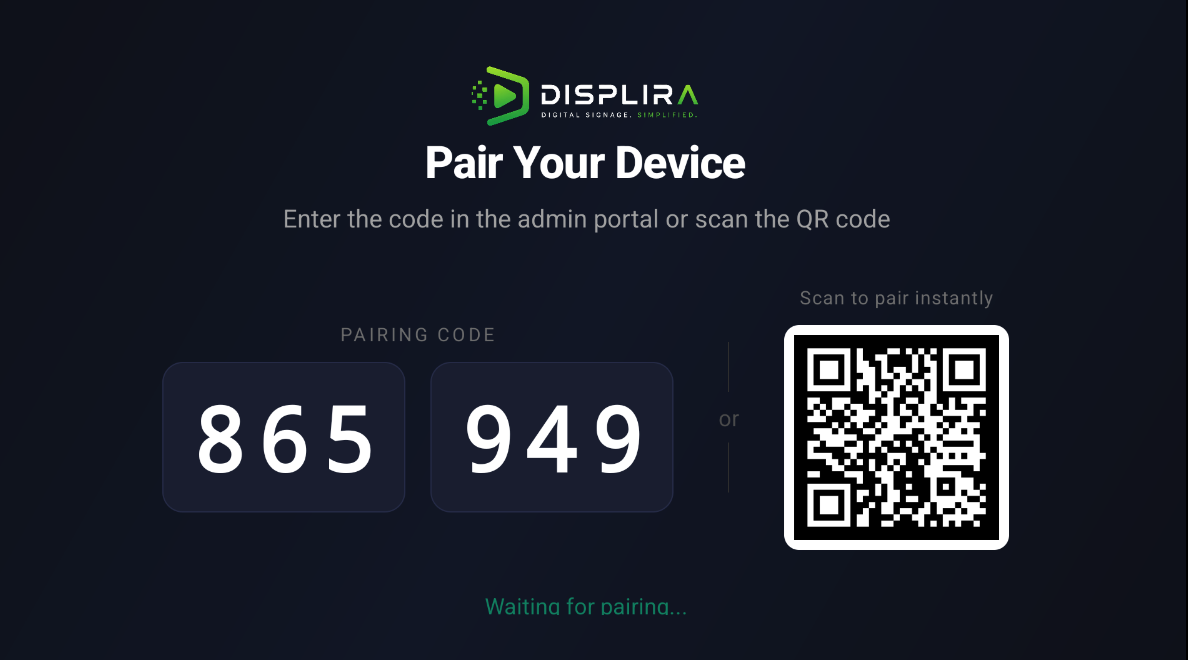
Pair Device
Enter a code or scan a QR to connect your device
Device Connected
Instant confirmation when the device is ready
Assign Screen
Assign content or layouts from the admin portal
Content Live
Content appears instantly on the display
Works with Fire TV, Android TV, Smart TVs, and commercial displays — no proprietary hardware required.
Screens That Work for You
From restaurant menus to corporate dashboards — see what your displays could look like.
Built for the Way Your Business Communicates
Displira adapts to the unique needs of every industry and environment.
Grocery & Supermarkets
- Price boards
- Fresh deals
- Department screens
- Rotating promotions
Ready to see Displira in action?
Get a personalized walkthrough of the platform, or explore our pricing to find the right plan.
Everything You Need to Run Professional Signage
A complete platform for content creation, device management, scheduling, publishing, and analytics.
Content Builder
Drag-and-drop editor with tables, carousels, tickers, images, videos, and custom HTML zones.
Screen Management
Organize screens across locations. Assign layouts, themes, and content zones per screen.
Device Management
Pair, monitor, and control Fire TV, Android TV, and browser-based displays remotely.
Scheduling
Schedule content by time, date, and location. Set broadcast windows and off-air hours.
Templates
Pre-built layouts for menus, announcements, promotions, event schedules, and more.
Real-Time Publishing
Push updates to all displays instantly. One-click publish with live preview.
Analytics & Monitoring
Track device health, uptime, screen status, and content performance in real time.
Roles & Permissions
Owner, Admin, Editor, Viewer roles. Control who can create, edit, publish, and manage.
Built for Growing Teams and Multi-Location Operations
Displira is designed from the ground up to support multi-tenant organizations, distributed teams, and large-scale deployments.
Multi-Tenant Foundation
Each organization operates in its own isolated space with separate users, devices, screens, and content.
Role-Based Access
Owner, Admin, Editor, and Viewer roles let you control who can create, edit, publish, and manage across the platform.
Device Control Plane
Pair, monitor, reboot, and manage devices remotely. Track connectivity, app version, and screen assignment from one place.
Real-Time Publishing Engine
Push content updates instantly to screens across locations. No waiting, no syncing, no delays.
Monitoring & Visibility
View device health, screen status, and publishing activity in real time from a centralized dashboard.
Deployment Ready
Cloud-hosted, API-accessible, and designed for fast rollout across multiple sites with minimal setup.
Works With the Devices You Already Have
No proprietary hardware required. Use affordable consumer devices or commercial displays — Displira runs on them all.
Android TV
Native app for Android TV devices
Fire TV Stick
Affordable plug-and-play signage
Smart TV Browser
Browser-based player for any smart TV
Commercial Display
Professional signage displays
Mini PC / Android Box
Compact dedicated players
Reliable by Design
Displira helps teams keep screens running, updated, and visible from one place.
Device Health Monitoring
Track device connectivity, status, and health in real time. Know which screens are online, offline, or need attention.
Offline-Friendly Player Experience
Players cache content locally so screens keep running even if the network drops temporarily.
Centralized Status Dashboard
See all your devices, screens, and locations in one view. Filter by status, location, or device type.
Publishing History
Track what was published, when, and by whom. Maintain a clear audit trail for every content update.
Faster Issue Detection
Get visibility into device issues quickly so your team can respond before screens go dark.
Clear Device Lifecycle
From pairing to decommission, manage the full lifecycle of every device in your network.
Software, Hardware Guidance, and Deployment Support
From your first screen to a full multi-location rollout — we're with you every step of the way.
Software Platform
Cloud-based CMS with drag-and-drop content editor, device management, and analytics.
Hardware Recommendation
Expert guidance on choosing the right displays and players for your space and budget.
Screen Setup & Pairing
Remote or on-site assistance to pair devices, configure screens, and go live.
Content Migration
We help you move existing content, menus, and media into Displira smoothly.
Deployment Planning
Site surveys, hardware specs, network requirements, and rollout timelines.
Ongoing Support
Technical support, platform updates, and proactive device health monitoring.
Launch Digital Signage That Scales With Your Business
Start with one screen, expand across locations, and manage everything from a cloud platform built for flexible hardware and real-time publishing.
Or start a free pilot →